


June 28th, 2009 in Wordpress Tutorials by Richard Carpenter
Widgetizing WordPress

 10 Votes, Rating: 4.10
 Loading ...
Widgetizing your wordpress theme sounds harder than it actually is. In this tutorial il show you how.
What Are WordPress Widgets
WordPress Widgets (WPW) is like a plugin, but designed to provide a simple way to arrange the various elements of your sidebar content (known as “widgets”) without having to change any code.
Taken from the wordpress codex
Widget Friendly HTML
When designing your wordpress theme theres a certain way you should concider coding your sidebar or part of the sidebar you want to widgetize. The best way is to use a simple list markup. Take the example below for instance.
<div class="sidebar-widget"><!--SIDEBAR WIDGET STARTS-->
<h3>Widget Title</h3>
<ul>
<li><a href="" title="item #1" >Item #1</a></li>
<li><a href="" title="item #1" >Item #1</a></li>
<li><a href="" title="item #1" >Item #1</a></li>
<li><a href="" title="item #1" >Item #1</a></li>
<li><a href="" title="item #1" >Item #1</a></li>
</ul>
</div><!--SIDEBAR WIDGET ENDS-->
In the code above we have a simple class of “sidebar-widget” inside our class we have a simple unordered list and our list items. This is an ideal markup for a wordpress widget.
Registering Our Sidebar
Now we have our ideal widget ready HTML code we’ve go to register our sidebar in our “functions.php” file. Open up your file in your code editor then add the code below.
<?php
if ( function_exists('register_sidebar') ) {
register_sidebar(array(
'name' => 'Right Sidebar',
'before_widget' => '<div class="sidebar-box"><!--SIDEBAR WIDGET STARTS-->',
'after_widget' => '</div><!--WIDGET BOX ENDS-->',
'before_title' => '<h3>',
'after_title' => '</h3>',
));
}
?>
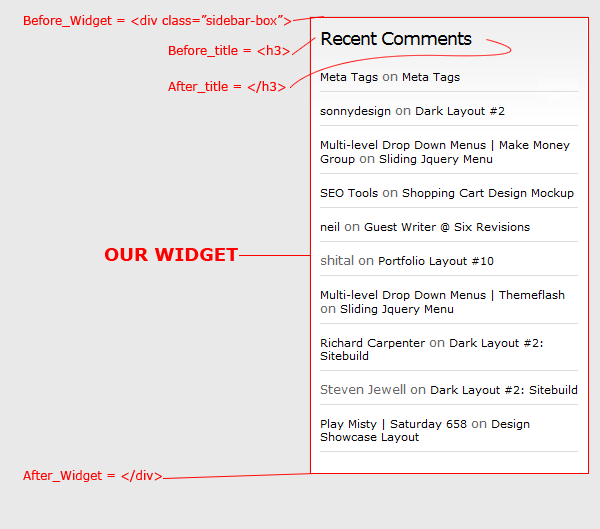
Let me explain the code above in abit more detail. There are 5 parameters you need to set, the first one is “name” which will be the name of your widget area, when you add the name it will appear in the widget pallette.

The second parameter is “before_widget” in this part you need to put the start of your widget, which in our case is our div class “sidebar-widget”. The third parameter is “after_widget” this will be the end of our widget, in the space we need to put our ending div.
The last two parameters we need to input are “before_title” and “after_title”, if you look in our simple HTML list we have a widget title wrapped in a “H3″ tag.
Adding The Widget Into The Widget Area
You can have a widget any where you see fit, but for the widget to work you first need to add a couple lines of PHP into the area of your theme where you want the widgets to appear. The code looks like this.
<?php if ( !function_exists('dynamic_sidebar') || !dynamic_sidebar("Right Sidebar") ) : ?>
<?php endif; ?>
Notice in the code above we have our “right sidebar name” if you were to have more than one widget area on your theme you can easily define what goes in what widget area and where. To add a second widget area you need add another snippet of widget code like this.
<?php
if ( function_exists('register_sidebar') ) {
register_sidebar(array(
'name' => 'Left Sidebar',
'before_widget' => '<div class="LEFT-sidebar-box">',
'after_widget' => '</div>',
'before_title' => '<h3>',
'after_title' => '</h3>',
));
}
if ( function_exists('register_sidebar') ) {
register_sidebar(array(
'name' => 'Right Sidebar',
'before_widget' => '<div class="RIGHT-sidebar-box">',
'after_widget' => '</div>',
'before_title' => '<h3>',
'after_title' => '</h3>',
));
}
?>
Once you’ve inserted your widget code into the area you want it, upload your files and give it a whirl, just dont forget to style your HTML in your stylesheet. Thats it all done, any questions dont hesitate to ask.

Be Part Of The Community!
Become part of the hv-designs community.
Subscribe Via RSS or Follow Us On Twitter.


19 Responses to “Widgetizing WordPress”