


October 4th, 2007 in Photoshop Tutorials by Richard Carpenter
Youthfull Looking Skin Tutorial


 6 Votes, Rating: 3.83
 Loading ...
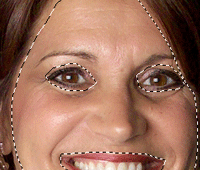
Open up your photo, select the pen tool and draw around the whole face area, excluding vital features like eyes and mouth also dont get to close to the hair line.
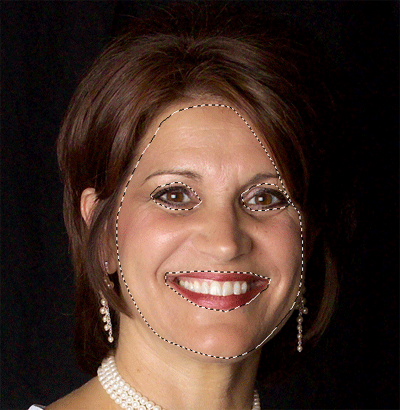
Copy & paste your selection to a new layer, then goto “filter > blue > guassian blur” blur the layer by about 2 pixels if it looks over blurred then take it down to about 1 or 1.5.

Add a layer mask to your layer.
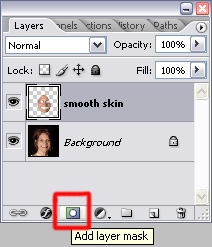
Select a reasonable brush size and the color black. Start to brush over things like the eyebrows, little bit of the hair line, nose holes, around the lips etc…, basically just vital features that make the face, ive also brushed over some facial lines. Heres mines.
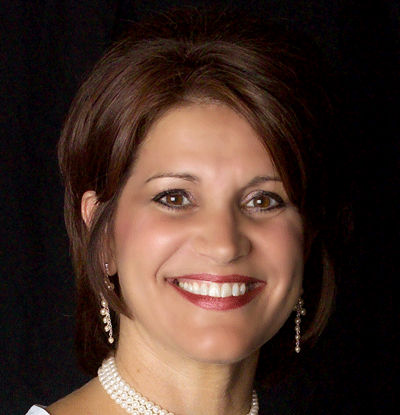
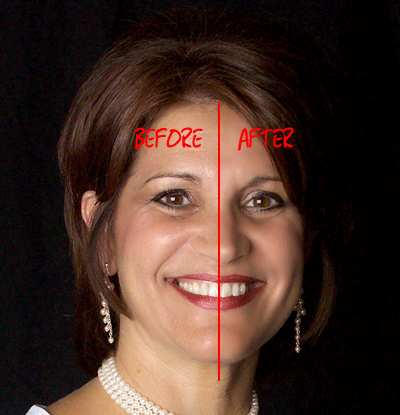
Now the before and after.

Be Part Of The Community!
Become part of the hv-designs community.
Subscribe Via RSS or Follow Us On Twitter.


5 Responses to “Youthfull Looking Skin Tutorial”