


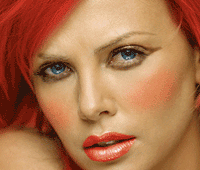
September 30th, 2007 in Photoshop Tutorials by Richard Carpenter
Virtual Makeover Tutorial

 13 Votes, Rating: 4.15
 Loading ...
Firstly lets start with the lips and make them a lush red, select your “pen tool” and draw around the lips. Then copy and paste to a new layer, “CTRL + C then CTRL + V”.
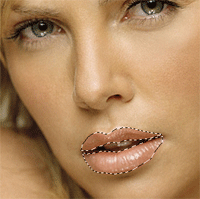
Rename the layer your lips are on to “lips” then goto “image > adjustments > hue/saturation” or press “CTRL + U” use settings below.
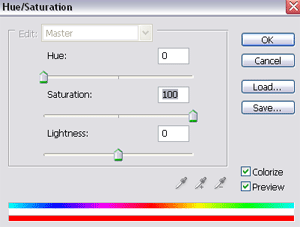
Now once the color is applied set your “lips” layer to “softlight” and opacity to about 80% depending on how red you want the lips.

Now create a new layer an name it “blusher”, select your brush tool and select a soft brush with a size of about 100pixels.
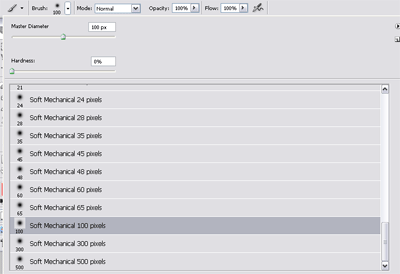
Now select your color picker and select a color similar to below.

Now brush the cheeks gently, then set layer mode to “softlight” heres mine.

Now select your pen tool and draw around the eyes like this.
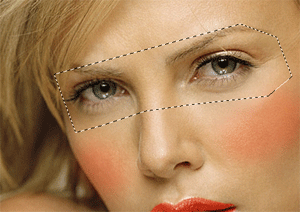
Then copy/paste onto a new layer, select your “burn tool” with a brush size of about 15pixels and just burn around the eyes like this. if its too dark lower the opacity to suit.
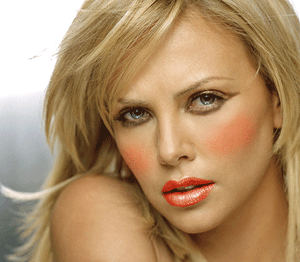
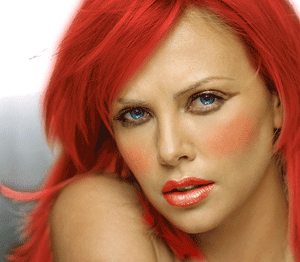
Thats it all done. you can also do other things like change hair color and eye color like this.

Be Part Of The Community!
Become part of the hv-designs community.
Subscribe Via RSS or Follow Us On Twitter.


3 Responses to “Virtual Makeover Tutorial”